Tooling / Build
rustybara
A self-built open-source Rust prepress toolkit, plus the brand, illustrated mascot, marketing site, and in-browser demo around it. Proof I don't just use the tools, I design and build them.
- Year
- 2026
- Role
- Designer & Engineer
- Tools
- IllustratorRustwasm-bindgenlopdfPDFium
- cargo
- wasm32
- MIT
At a glance
- 2-page @ 600 DPI
- 4.2s · ~25× vs Acrobat
- 52-page @ 600 DPI
- 16.5s · ~7.5× vs Acrobat
- Targets
- CLI · TUI · GUI · WASM
- Engine
- Rust · PDFium
The goal
Commercial print runs on a handful of repetitive, error-prone PDF chores: stripping crop and
registration marks, resizing to bleed, remapping a CMYK value across every content stream, splitting
spreads into panels. Most shops solve these with a patchwork of one-off scripts and manual Acrobat
passes. The scripts I’d written on the floor (pdf-mark-removal, resize_to_bleed_or_trim_pdf, and pdf-2-image) each proved a primitive, but they lived as separate, unmaintained CLIs.
The approach
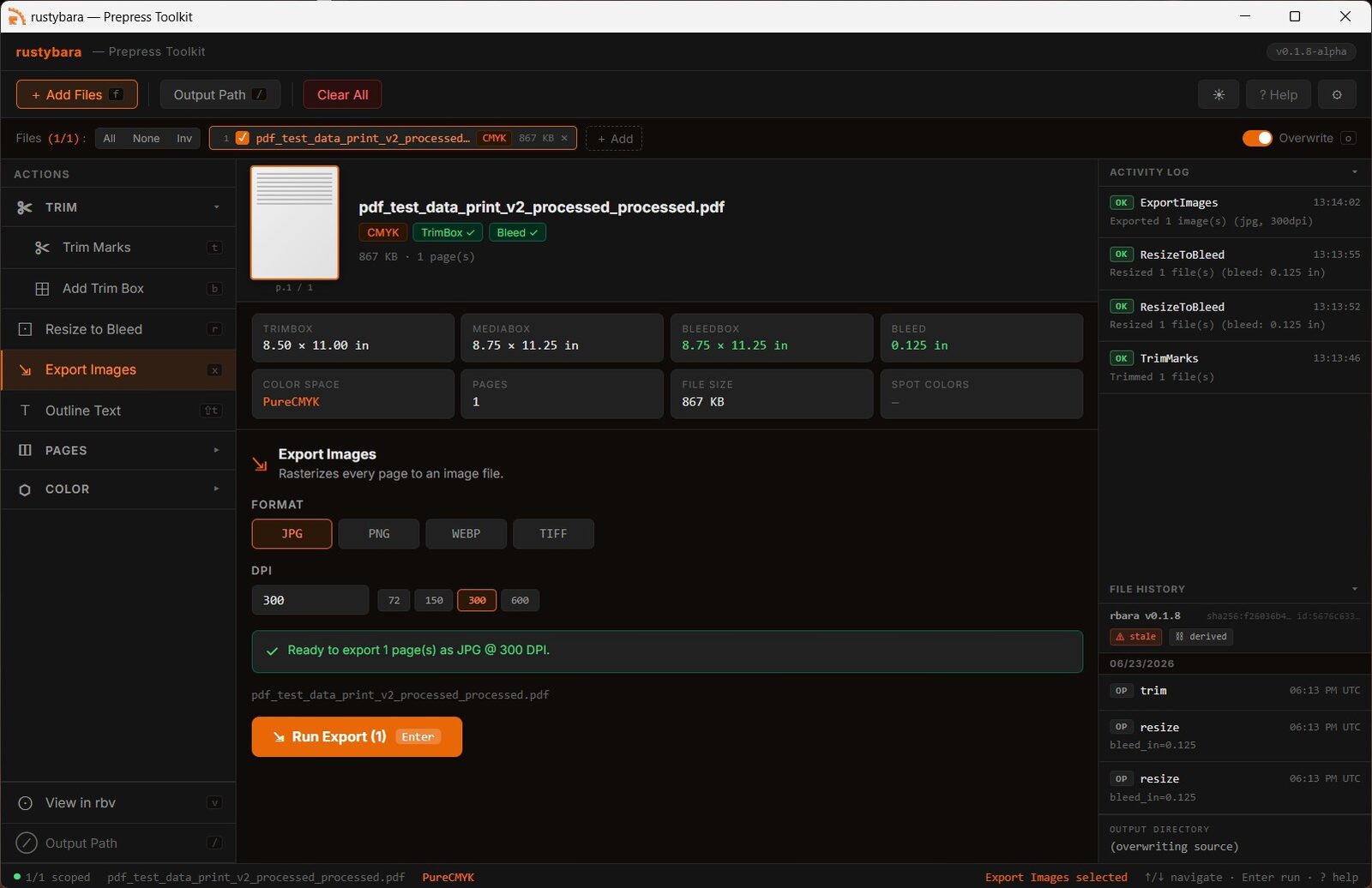
I unified those three tools into a single Rust library with an opinionated, prepress-first API. Where lopdf speaks in low-level PDF objects, rustybara speaks in boxes, bleeds, inks, and DPI, the
vocabulary of the people actually doing the work. It ships as a library crate plus a TUI/CLI
(rbara), a GPU page viewer (rbv), a native desktop GUI, and WebAssembly bindings that run the
same operations entirely in the browser.
Production detail
The core invariant is that the TrimBox is always the source of truth and is never mutated by any operation, so every trim, resize, and split reasons from it. CMYK remapping rewrites matching fill/stroke values directly in the content streams within a tolerance. An XMP provenance block records a SHA-256 of the source file, a timestamp, and the ordered list of operations applied, so a processed PDF carries a verifiable lineage. The whole thing builds to four platforms from a single git tag via GitHub Actions, each artifact bundling its own pinned PDFium.
Outcome
rustybara is published on crates.io, documented on docs.rs, and used in daily production. The WebAssembly build powers the live playground on this site: add trim boxes, trim print marks, and resize to bleed, with each PDF’s color space and provenance analyzed automatically, entirely client-side and nothing uploaded. Where it’s been measured, the speedups are real. The rasterizer renders a dense two-page prepress PDF to 600-DPI images in about 4 seconds against roughly 1m45s in Acrobat, on the order of 25×, and a 52-page book in about 16 seconds versus around two minutes (about 7.5×).
Brand & interface
rustybara isn’t only a library, it’s a designed product. I created its full visual identity, an illustrated mascot (the rusty capybara), and an editorial marketing site at rustybara.com, giving an open-source tool the kind of brand most never get. The in-browser playground is the interactive centerpiece: a real prepress demo anyone can drive, designed so the operations stay legible and the result is immediate. Brand, illustration, and interface, the same end-to-end design thinking as the rest of this site, pointed at my own tool.